ViteVPS - VPS & Server Management
Set up Ubuntu servers, deploy Laravel, PHP, static and Node.js applications, install WordPress, and manage databases, SSL certificates, monitoring and backups.
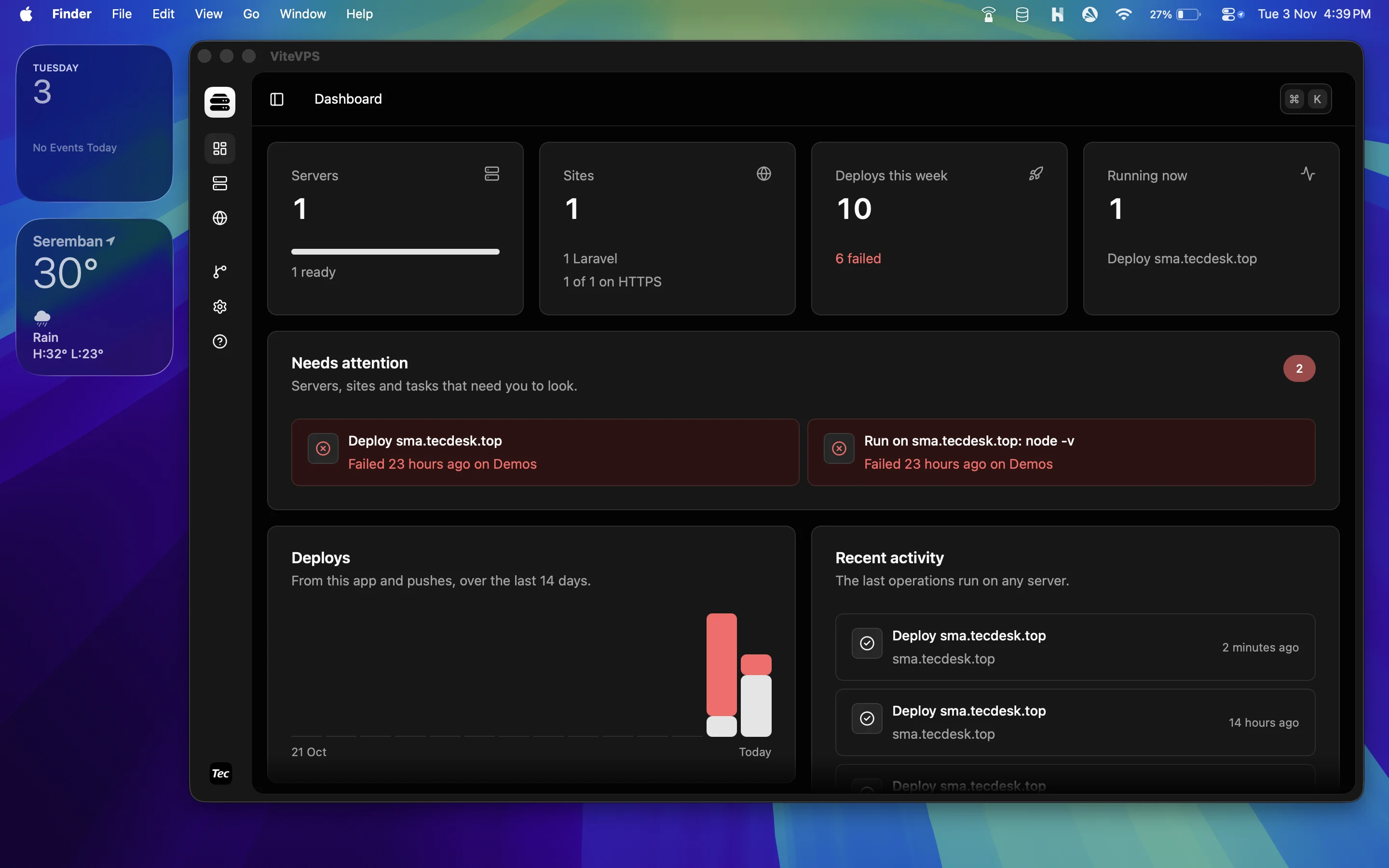
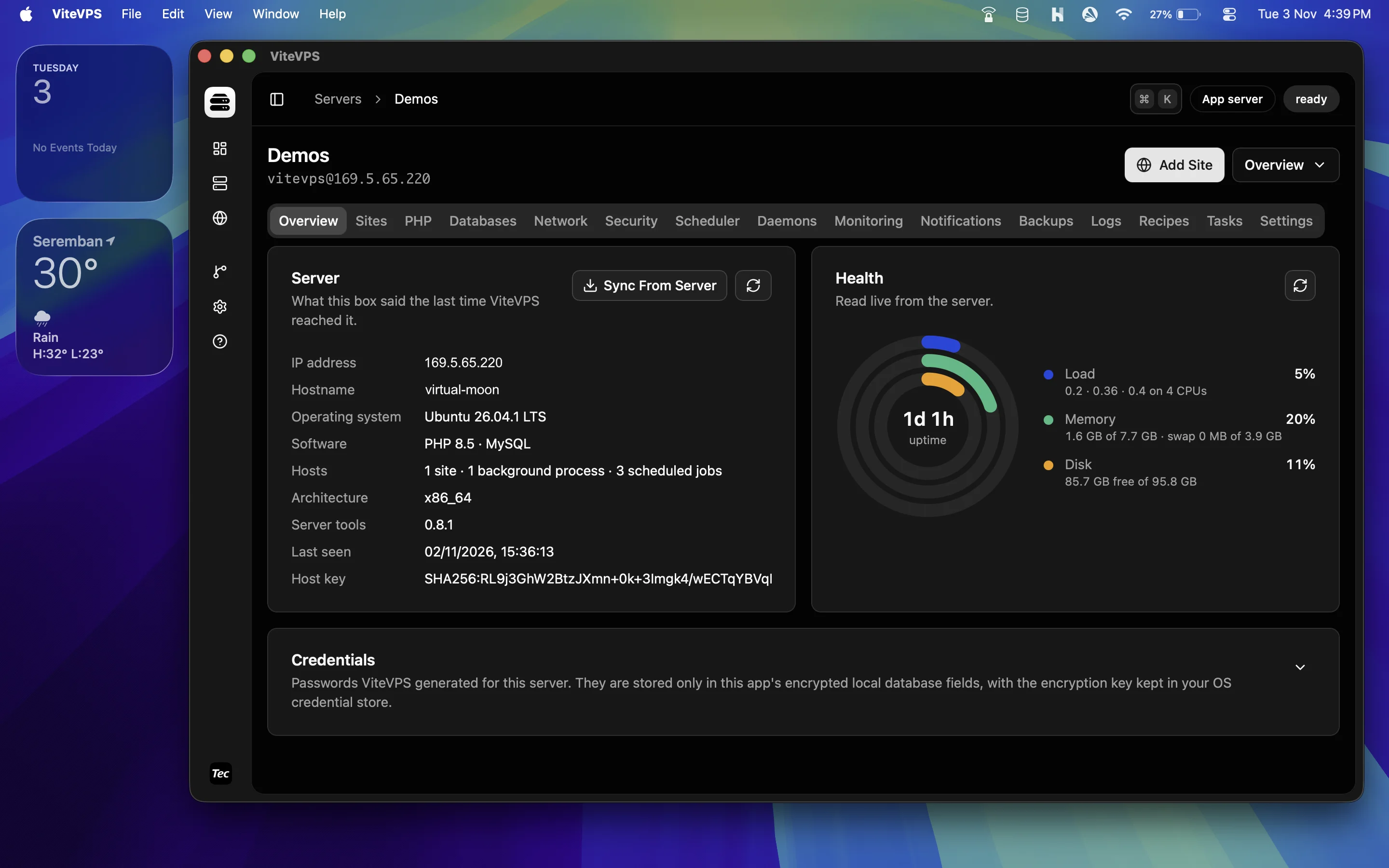
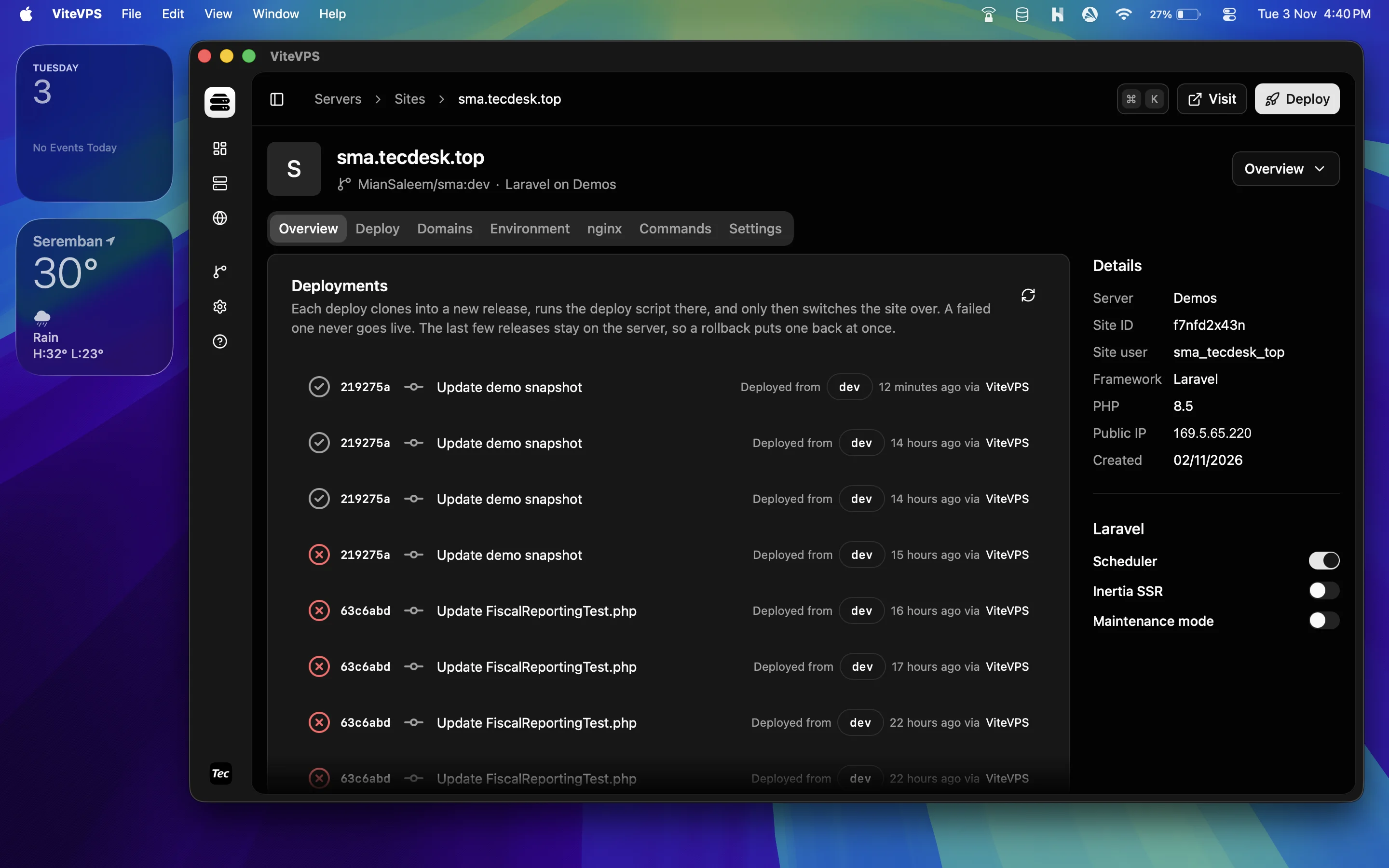
ViteVPS - VPS & Server Management at a glance
- Category:
- Desktop Applications
- Platform:
- Windows, macOS
- Requirements:
- WebView2
- Latest version:
- v0.1.5
- Price:
- From $49.00
- Last updated:
- Nov 10, 2026, 3:53 PM
- Refunds:
- 30-day money back guarantee
ViteVPS — Manage Your VPS and Deploy Web Apps from Your Desktop
Spend less time configuring servers. Spend more time building your product.
ViteVPS is a desktop server management app that provisions and hardens Ubuntu servers, deploys web applications, and brings everyday maintenance into one interface. It connects directly to your own VPS over SSH, helping you manage Laravel, PHP, Node.js, static websites and WordPress without maintaining every configuration by hand.
Bring your own server. Choose your stack. Deploy your application. Keep your infrastructure under your control.
Start with one server and two websites without license activation.
Turn a Fresh VPS into a Working Application Server
A new VPS gives you flexibility, but getting an application online takes more than installing a web server. You need the right runtimes, database, firewall, SSH access, certificates and deployment process. As projects grow, so does the work of keeping those pieces consistent.
ViteVPS brings that work together. Guided provisioning installs the services your server needs and applies security settings. Site management handles domains, runtime settings and application configuration. Deployment tools prepare new releases, keep a history and let you return to a previous release when needed.
| What gets in your way | How ViteVPS helps | What you gain |
|---|---|---|
| Repeating server setup for every project | Guided Ubuntu provisioning with web, runtime, database and cache options | A repeatable starting point for new projects |
| Updating live application files by hand | Separate release directories, deployment scripts and an atomic release switch | A more controlled deployment process |
| Tracking settings across terminal sessions | One interface for sites, PHP, databases, jobs, services and logs | Less time searching for the right command or configuration |
| Finding out about failures too late | Scheduled server checks and notifications | Earlier visibility into resource and service problems |
| Managing database backups manually | Scheduled encrypted database backups to S3-compatible storage | A repeatable backup and restore workflow |
| Adding infrastructure as an app grows | Dedicated server roles, remote databases, workers and load balancing | Tools to distribute workloads across your servers |
Features That Help You Ship and Maintain Your Applications
Set Up Ubuntu Servers with Guided Provisioning
Connect a fresh Ubuntu server and choose the services it needs. ViteVPS installs the stack, configures a firewall, enables fail2ban and automatic security updates, and creates an administration user.
On newly provisioned servers, root and password SSH login are disabled only after ViteVPS confirms that the new administration login works. Provisioning runs on the server and can continue if the app closes or the connection drops; reconnect to pick up the task log.
Choose an all-in-one application server, or dedicated web, worker, database, cache and load balancer roles.
Manage Laravel, PHP, Node.js, Static Sites and WordPress
Use one app for different kinds of projects:
- Laravel: Create a site with a database, deploy from Git, and manage environment settings, scheduled jobs and background workers.
- PHP: Deploy Git-based PHP applications and choose their PHP version.
- Node.js: Run an application as a managed service behind nginx, with its own Node version and start command.
- Static websites and SPAs: Deploy files from Git, optionally build with Node, and enable routing for single-page applications.
- WordPress: Install with WP-CLI and manage its server settings. WordPress updates happen through WordPress rather than Git deployments.
New sites use a separate Linux user by default, helping keep each site's files separate from other sites on the server.
Deploy from Git with Release History and Rollback
Prepare each deployment in its own release directory. ViteVPS runs your deployment script before switching the live application to the new release, then reloads or restarts the relevant services.
View deployment history and logs, retain shared files such as Laravel storage and environment settings, and roll back to a retained release without cloning or rebuilding it. Optional post-deployment health checks can restore the previous release when the new release fails its check.
Connect GitHub or GitLab to browse repositories, configure push-to-deploy webhooks, or call a deployment trigger from your CI workflow. Repository deploy keys and webhooks are added manually in your Git provider's settings.
Application rollback restores code; it does not reverse database migrations or changes to shared files.
Bring Laravel's Everyday Operations into One Place
Manage queue workers, Horizon, Reverb, Inertia SSR and other long-running commands as background services. Add scheduled jobs for Laravel's scheduler, run Artisan commands, edit environment settings and enable Laravel maintenance mode.
Custom deployment scripts let you choose the build and release steps your application needs.
Manage Domains, HTTPS and nginx Settings
Add domain aliases and issue Let's Encrypt certificates with automatic renewal. ViteVPS checks DNS and port 80 reachability before requesting a certificate, helping you catch common setup problems early.
Configure redirects, password protection and custom nginx directives. Configuration changes are checked with nginx -t and restored if validation fails. Custom directives are kept separately so certificate and deployment-hook changes preserve them.
Control PHP, Databases and Server Services
Install multiple PHP versions, choose the CLI default, adjust PHP settings and manage OPcache. Create MySQL or PostgreSQL databases and users, manage access, and inspect connection details.
Use Valkey, or Redis on Ubuntu 24.04, for caching. Manage firewall rules, SSH keys, scheduled jobs and background services from the same app. Follow server and application logs when you need to investigate an issue.
Monitor Server Health Even When the App Is Closed
Server-side monitoring records CPU, memory, disk and load every five minutes. Configure thresholds for resource use, failed services, certificate expiry and late backups, then review a week of charts in the app.
Send deployment, monitoring and backup notifications through email, Slack, Discord, Telegram or a webhook. Monitoring, notifications and scheduled backups run on the server, so they continue while ViteVPS is closed.
Schedule Encrypted Database Backups
Back up MySQL and PostgreSQL databases to S3-compatible object storage, including services such as AWS S3, Cloudflare R2, Backblaze B2, Wasabi and MinIO.
Dumps are compressed and encrypted on the server before upload. Set retention, run a backup on demand and restore into the same database or another database. Keep the encryption passphrase safe: restoring a backup requires it.
These are database backups. Arrange separate protection for uploaded media and other site files.
Organize Applications Across Multiple Servers
Start with one server and separate workloads as your project needs change. Put a database or cache on another server, run background jobs on a worker, or configure an nginx load balancer across application backends.
Peer access rules allow specific servers to reach the services they need. Site copies can share the original site's database and cache. Deploying the original from the app also deploys its copies in sequence; a push webhook deploys only the server it reaches.
Keep Server Management on Your Own Machine
ViteVPS communicates with your servers directly over SSH. Its application database lives on your computer, with stored passwords and tokens encrypted using a key held in your operating system's credential store. SSH private keys are sealed for use by the app's core.
Each managed server also keeps its own configuration record, allowing ViteVPS to sync its managed sites back into the app after a reinstall. Management does not pass through a ViteVPS cloud control service. License activation and periodic license checks use an online service.
Who Is ViteVPS For?
- Laravel and PHP developers who want a repeatable way to set up servers and deploy applications.
- Freelancers and agencies maintaining several client websites across their own VPS instances.
- SaaS founders who want control of hosting while simplifying routine infrastructure work.
- Developers running mixed stacks who need Laravel, Node.js, static websites and WordPress in one management interface.
ViteVPS automates common tasks while leaving you in charge of your servers, application code and hosting decisions.
How to Get Started
- Bring a fresh Ubuntu VPS. Use Ubuntu 24.04 or 26.04 with root access or a user with passwordless sudo.
- Connect and provision. Add the server, configure SSH access, select its role and choose the services to install.
- Create your site. Add a domain and application type. For Git-based sites, choose a repository and add the supplied deploy key to it.
- Deploy and maintain. Deploy the application, configure HTTPS, and set up monitoring, notifications and database backups.
You supply the VPS, domain and any external storage or notification services. ViteVPS manages supported servers; it does not include hosting.
Take Control of Your Next Deployment
Bring server setup, application deployment and everyday maintenance into one desktop workflow. Use your own infrastructure and give yourself more time to work on the applications it runs.
Try ViteVPS with one server and two websites without activation. Activate a Tecdiary license when you need to add more.
Frequently asked questions
What is ViteVPS?
ViteVPS is a desktop VPS management app for provisioning Ubuntu servers, deploying web applications and managing server maintenance over SSH. It supports Laravel, PHP, Node.js, static websites, SPAs and WordPress.
Can I use ViteVPS with my current VPS provider?
ViteVPS connects over SSH rather than requiring a particular hosting provider's API. Your server must meet its Ubuntu and access requirements. Provisioning is intended for a fresh server.
Is ViteVPS an alternative to Laravel Forge?
ViteVPS addresses similar tasks, including server provisioning, Laravel deployment, certificates and background workers. Its desktop app connects directly to your servers over SSH. Developers evaluating a Laravel Forge alternative should compare their required workflows, integrations and support needs; the products do not have identical features.
Can I try ViteVPS before activating a license?
Yes. ViteVPS allows one saved server and two saved websites without activation. Adding beyond that allowance requires a Tecdiary license. The website allowance is shared across servers and includes site copies.
Does my computer need to stay on to keep websites running?
No. Your websites and services run on your servers. Configured monitoring, notifications and scheduled backups also run there. You use the desktop app to connect and manage them.
Can ViteVPS manage an existing server?
It can sync servers already managed by ViteVPS. It can also discover an existing server's configuration and adopt the server, leaving discovered sites read-only. Adoption does not automatically convert existing sites into fully managed ViteVPS sites.
Does ViteVPS back up my entire website?
No. Its backup feature covers MySQL and PostgreSQL databases. Site files, uploaded media and a full server recovery plan require separate arrangements.
Does ViteVPS support wildcard SSL certificates?
Currently, ViteVPS supports Let's Encrypt certificates for named domains and aliases. Wildcard certificates and custom certificate uploads are not supported.
Which server operating systems are supported?
ViteVPS targets Ubuntu 24.04 and 26.04 on amd64 and arm64 servers. Other server operating system releases are refused during the compatibility check.